

24Jan Singular Software DualEyes Mac discount

One of the software programs I use the most in my post workflow when working with the Canon 7d and Zoom h4n is DualEyes by Singular Software. This Great program Allows me to import audio and video clips from my camera and field recorder, sync them, then export them as a single video file. The only work for me is selecting the correct files to sync. If that’s not your favorite work flow, DualEyes will also cut to length, relabel audio, and generate an xml file for you to use with your NLE software.
The nice thing is that it doesn’t transcode video files. DualEyes simply replaces the audio in the video clip with the proper audio from the field recorder. This saves me at least an hour every time i sit down to edit footage.
The reason I bring all of this up is that Singular Software has just released DualEyes for Mac. As part of their release promotion you can get a copy of DualEyes (for mac osX) for a very reasonable $119. My copy for windows was $149. That’s not a huge savings but $20 could buy you a nice remote control

If you haven’t heard of Singular Software’s programs, swing over to the site and check them out. They have plugins for Final Cut Pro, Premiere Pro, and Sony Vegas that preform similar tasks (although I prefer to sync my audio outside the timeline).
I don’t get any kick back for recommending this. It’s just a peace of software I love.
23Jan Should you use zoom lenses for DSLR filming?
I don’t recommend using zoom lenses for filming unless the zoom covers a focal length that is hard to find or not available. Two such focal lengths are covered by the Tokina 11-16mm f2.8 and the canon 16-35mm f2.8. I’ve already done a review on the tokina 11-16mm, but i thought it might be nice to compare the Canon 16-35mm f2.8 and the Tamron 17-50mm f2.8.
The Tamron 17-50mm f2.8 is a budget zoom that you can pick up for around $450.
The Canon 16-35mm f2.8 is a ruffly twice that price:
The benefits of using a nicer Zoom can be seen in the full time manual focus, the longer travel of the focus ring, the stationary barrel, and the smooth operation of the zoom. These are all very nice to have but $500 in your pocket might help you forget about many of these short comings.
Other zooms to consider include the Tamron 28-75mm f2.8:
And the canon 24-70mm f2.8:
Although i don’t generally use these last 2 lenses for filming, they are great for photography.
If you must use a Zoom lens for filming make sure it is a constant F-stop across all focal lengths or your lens will automatically stop down as you zoom causing unwanted color changes and dimming of your video image.
Equipment used in this video:
Canon 7d & t2i
Canon 16-35mm f2.8
Canon 35mm f1.4
Tamron 17-50mm F2.8
CPM film tools mounting parts
Sennhieser G2 Wireless mic system
22Jan Better audio recording tips for DSLR filming
Recording audio can be one of the most important things you can do for your work. One of the first things I recommend for new DSLR shooters is an XLR splitter. By splitting the audio output of your microphone, you can record 2 different volume levels at the same time. This is very handy if you don’t have time or the extra help running your field recorder. If one audio level peaks you can always switch to the second audio channel in post. Or if the lower audio signal is loud enough you could use that for the entire take. But remember the louder audio channel has a better signal to noise ratio, so audio will always be a little cleaner if its louder (unless it peaks).
Another Very handy item is the Zoom h4n remote control. This gives you a very basic audio read out and allows you to start and stop the zoom h4n without having to handle your field recorder. I recommend adding Velcro to the back of your remote so it can be mounted in a handy location.
22Jan USB attached fallow focus for your canon DSLR
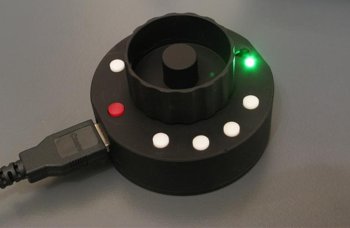
The guys over at the 5d Mark II team blog have posted information on a new usb dongle that can act as a fallow focus using your lens AF motor. It appears that this will work with all of canon’s current DSLR cameras.
For a compact solution to focus pulling this could be a must have item. Some lenses like the Tamron and Sigma models might be to noisy for this to be handy, but if you have a large selection of nice quiet canon glass this could make life a lot easier. Imagine not having to attach a focus gear or needing a set of rails for your fallow focus. I’m hoping that the price will stay under $300, that would make it an easy pick over some of the more expensive hardware fallow focus choices out there. I’ll be keeping an eye out on there blog for release date and pricing information. Lets hope this isn’t a hoax.
21Jan Hot Shoe Mounting your Lilliput Monitor
There are several options for mounting your field monitor on the hot shoe plate of your camera. One option is to use a 1/4 20 to hot shoe adapter, they run about $3. If that doesn’t work well enough for you then you can add this very affordable ball head for about $6. Even if you don’t end up using it for direct mounting on your camera this little set up can work well for all most any kind of equipment.
If you feel like spending a few more dollars, then an adjustable friction arm might be the best option. You can pick one up for around $45 on ebay. I have nothing but good things to say about these friction arms. I have at least 2 mounted on all of my rigs. For the price I haven’t found anything better.
All of these options are great if you don’t want to spend the money on a full DSLR rig, but remember that the hot shoe on your camera isn’t rated for a lot of weight. A single field monitor is fine, or a single field recorder but Try not to over do it or you could damage your camera’s hot shoe mount.
Equipment used in this video:
Canon 7d & t2i
Canon 35mm f1.4
Lilliput field monitor
CPM film tools mounting parts
Sennhieser G2 Wireless mic system
17Jan What lenses should I use for DSLR filming on a budget?
One of the most frequent questions I get is “what lenses should I buy for filming?” For me the main reason to use a DSLR camera for filming is its great low light performance and shallow depth of field. If you don’t want those two things then you may well be better off using an HD video camera.
With that in mind, I Always recommend prime lenses. They are faster, sharper and generally better preforming then their zoom counter parts. I recommend zooms only to cover ranges that aren’t available in primes, like the Tokina 11-16mm F2.8:
If your on a budget I recommend:
The Sigma 30mm f1.4:
The Canon 50mm f1.4:
Canon 85mm f1.8:
This 3 lenses will cover most of the normal focal lengths you’ll need for filming. If you have plans of upgrading to a 5d mark II in the future you might want to consider changing out that sigma 30mm f1.4 for
The canon 28mm f1.8:
I prefer the sigma 30 to the canon 28, but the sigma is only designed for crop sensor cameras.
One other item to consider is a Normal video camera. Camera’s like the Canon HF s100 have the same sensor as canon’s newer video cameras and can be picked up for under $500 used on ebay. Chances are you’ll need to zoom or use Auto focus at some point and footage from cameras like this will splice in well with your DSLR footage.
Equipment used in this video:
Canon 7d & t2i
Sigma 24mm f1.8
Canon 35mm f1.4
Lilliput field monitor
CPM film tools mounting parts
Sennhieser G2 Wireless mic system
15Jan Zoom H4n & H1 protective Case
I’ve been searching All over for a nice case to use for my Zoom H4n and I’ve finally found one.
The Case is very Sold and seems well made. Plus its the only one i could find that was small enough to fit in my back pack.
If you don’t have a case for your zoom h1, the accessory Kit is available Here: Zoom APH-1 Handy Recorder Accessory Package

Its a little pricey, but it does includes an extra wall wort, power cord and microphone stand adapter.
The company also makes cases for a number of other items, you can
Equipment used in this video:
Canon 7D & t2i
Zoom h1 & h4n
Canon 35mm f1.4
Canon 50mm f1.2
CPM film tools mounting parts
Sennhieser G2 Wireless mic system
15Jan Canon T2i Magic Lantern overview
Visit the Magic Lantern Wiki Page were you can find all the files and information you’ll need to install the magic lantern firmware hack.
This video goes over a few of the main menu’s and things to look out for once you’ve installed the Magic lantern T2i firmware update. Remember this is a hack and if you make a mistake when installing it, you could damage your camera.
There are still a few bugs with the software including the fact that you have to press the menu or shutter button to get some of the graphic’s to redraw. But after testing and using it for a few day’s I think I feel comfortable taking it out on a job. I’ll still bring my 7d with me (of course), but having the option to properly record audio to the camera makes life a lot easier.
Equipment used in this video:
Canon 7d, Canon t2i
Canon 16-35mm f2.8
Canon 35mm f1.4
Lilliput hdmi field monitor
Zoom h1 and H4n
CPM film tools brackets and mounts
13Jan Canon t2i Magic Lantern Firmware Upgrade
I just had a chance to upgrade my Canon t2i to the magic lantern firmware and was happy to discover that all the magic lantern read outs work on my hdmi field monitor. The other nice thing is that my camera remote still works with the magic lantern firmware. So i can still pull focus and start and stop recording.
I’ll be covering more on the magic lantern update and features over the next few weeks.
Equipment used in this video:
Canon 7d
Canon t2i
Canon 50mm f1.2
Canon 35mm f1.4
CPM film tools mount
Sennheiser G2 wireless mic
Studio one XLR to 3.5mm adapter
Lilliput HDMI field monitor


